Device guides
IPTV Players Compared: TELOS, TiviMate, IPTVX, VLC and More

IPTV player · our recommendation
Recommended: TELOS
Your own playlist: live TV, films and series together in one app.
- Connect your own M3U playlist or Xtream account.
- Live TV and a programme guide when your source supplies EPG.
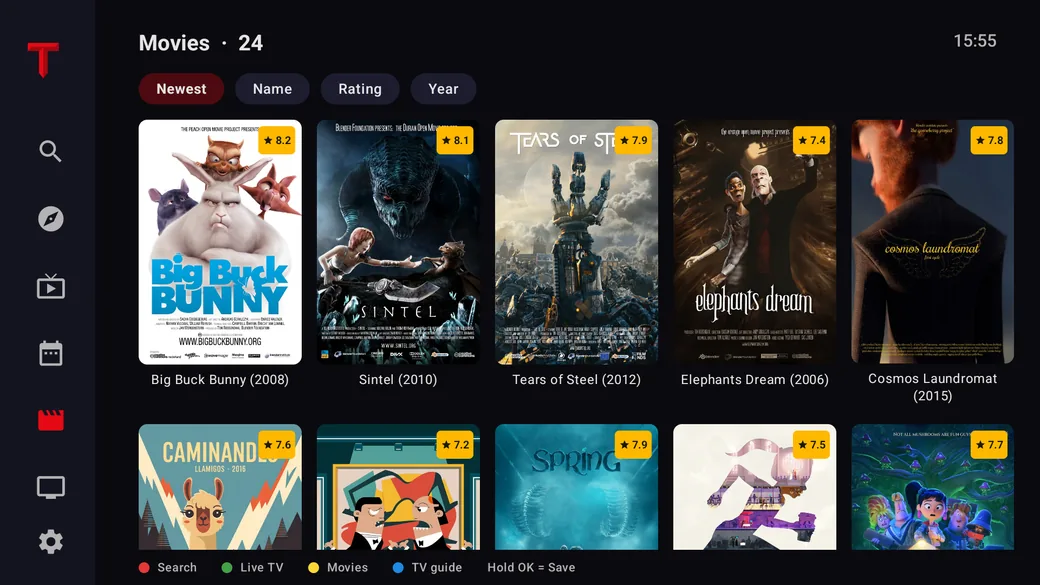
- Browse films and series from your own catalogue.
Check model support and platform features. Manufacturer information, not a comparative playback test. No channels or subscriptions included.
On this page
Recommended: TELOS for your own catalogue
TELOS is our recommended starting point when you want live TV, a programme guide and a film or series library in one player. Connect your own lawful M3U playlist or Xtream account. Your source determines which channels, titles and EPG data appear; TELOS includes no channel subscription. This recommendation is based on the manufacturer’s published features, not a measured performance win. Official TELOS product information.
Choose the matching platform page: Fire TV, Fire TV Stick, Apple TV, iPhone, iPad or Android. Features and release status differ by platform; check your exact model and store before installing. This is not a Windows recommendation.
Read the TELOS player profile for a structured overview. The Player Arena compares apps in pairs; it is separate from choosing a streaming box or television.
The right player depends on your device
There is no useful universal “best IPTV player” list without knowing your device and source. Start with Android TV or Google TV, Fire TV, Apple TV, a phone, or a Windows PC. Then check remote control, program guide (EPG), favorites, and cost.
A player is software for playback. It does not supply a channel package or grant rights to a stream. Use a service’s official app or a source you are authorized to access.
Quick guide by device and use
| Your setup | App to investigate | Check first |
|---|---|---|
| Supported TV or mobile device | TELOS — recommended | Exact platform, lawful M3U/Xtream source and available features |
| Android TV or Google TV | TiviMate | Store availability, supported source format, and current features |
| Apple devices | TELOS first; IPTVX or UHF as alternatives | Exact platform, model, and regional store listing |
| Windows PC and a supported network stream | VLC | Stream format and your authorization to access it |
| A configurable media center | Kodi | Device support and required add-ons |
| Fire TV | TELOS, after checking the exact model | Operating system and app publisher |
This is a starting point based on official product information, not a side-by-side performance test. For Fire TV, see how to check your Stick and app.
TiviMate: a TV interface for Android TV
TiviMate’s Google Play listing describes an Android TV player with playlist and EPG features. It may suit a television setup where you browse with a remote. It does not include channels. Check the current listing for device and feature details, then use the TiviMate setup guide. Q1
IPTVX and UHF: verify the exact platform
IPTVX and UHF publish their supported platforms and features on their official sites. Treat those lists as a prompt to check the store on your own device, not a guarantee for every model or region. Q2 Q3
VLC: a straightforward PC option
VLC is a free media player for files and supported network streams. That can work well for checking one source on a computer. A TV-focused experience with channel groups, favorites, and a guide is a different use case. Q4
Kodi: a configurable media center
Kodi is a free, open-source media center. It does not provide media or channel sources. It can make sense if you want to organize your own media and compatible add-ons in one interface, but it may take more setup than a dedicated player. Q5
Questions to check before choosing
| Criterion | Ask yourself |
|---|---|
| Device | Is the app available for my exact model? |
| Controls | Does the remote, keyboard, or touch interface suit me? |
| Source | Does the player support the format my service provides? |
| EPG | Does it support my guide source and channel mapping? |
| Cost | Which features require a purchase or subscription? |
Call an app a “best” or “top-rated” choice only when the ranking is supported by a clear, current method. This guide is a device-based shortlist, not a product test.
Frequently asked questions
Will an Android TV app work on every smart TV?
No. Samsung, LG, Fire TV, and Apple TV use different app platforms. Check the TV’s own store and the service’s device list. See our Samsung and LG app guide.
Why is the player empty after installation?
A player usually needs a separate, authorized source or service account. Installing the app does not add channels.
Which options are free?
VLC and Kodi are free software. Pricing and premium features for other apps can vary by platform, version, and region; verify them in the current store listing.
Existing app sources checked October 23, 2026; TELOS information added October 27, 2026. Based on linked official product and store pages; no app, device, or playback comparison was performed. The image is illustrative.
Sources and access dates
- Q1: TiviMate IPTV Player on Google Play
Oct 23, 2026 · Developer listing describes Android TV focus and playlist/EPG features.
- Q2: IPTVX official site
Oct 23, 2026 · Vendor-published platform and feature information.
- Q3: UHF official site
Oct 23, 2026 · Vendor-published platform and feature information.
- Q4: VLC media player
Oct 23, 2026 · VideoLAN describes VLC and supported media playback.
- Q5: About Kodi
Oct 23, 2026 · Kodi describes its free media center and lack of included media.
- Q6: TELOS: official product and device information
Oct 27, 2026 · Own M3U/Xtream source; live TV, source-dependent EPG and media library; device-specific availability. Manufacturer information, no independent product test.